
Windows cannot boot with Fatal Error: No Free Memory for XSDT
- Parallels Desktop 7 for Mac
- Parallels Desktop 6 for Mac
Symptoms
Windows cannot start showing black screen with the error message:

Cause
Slic loader application that was previously installed on your Windows system doesn’t support WAET functionality. WAET stands for Windows ACPI Emulated Device Table. It is an optimization tool for virtualized guest OS from Microsoft. WAET support will be introduced in future version of Parallels Desktop for Mac.
Resolution
Meanwhile you can disable WAET support in Parallels Desktop for Mac:
1. Go to Parallels Desktop Configuration –> Hardware –> Boot Order and find Boot Flags field:
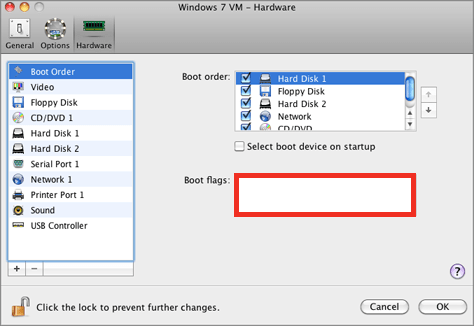
2. Copy/paste the following line there:
kernel.waet.enable=0
3. Save the changes and start your virtual machine.
Leave a Reply